
Quick answer
Enter Hostinger referral code W8XHELLOY1EH at checkout, or follow the referral link already connected to this page, and confirm that the 20% discount appears before paying. The referral discount is intended for eligible new purchases; plan eligibility and terms should always be checked at checkout.
Current Hostinger discount code: W8XHELLOY1EH
The current Hostinger discount code is W8XHELLOY1EH. It provides 20% off an eligible new Hostinger purchase. This is a referral offer, so the code and discount are shown in the main offer panel as well as here in the body copy.
Before paying, check that W8XHELLOY1EH has been accepted and that the promised Hostinger discount is shown in the order summary. If it is not visible, do not assume it will be added after purchase.
How to use the Hostinger promo code
- 01Follow the Hostinger referral link on this page.
- 02Choose the eligible hosting or website product that suits your needs.
- 03Select the subscription period and review the plan inclusions.
- 04Enter W8XHELLOY1EH in the coupon, promo or referral-code field if it has not already been applied.
- 05Confirm that the 20% Hostinger discount appears before completing payment.
- 06Save the order confirmation and note the future renewal price and date.
Hostinger sometimes runs public promotions as well as referral offers. Compare the final checkout total rather than assuming two offers can be combined. The best available price may depend on the product, term, customer status and current promotion.
My experience with Hostinger
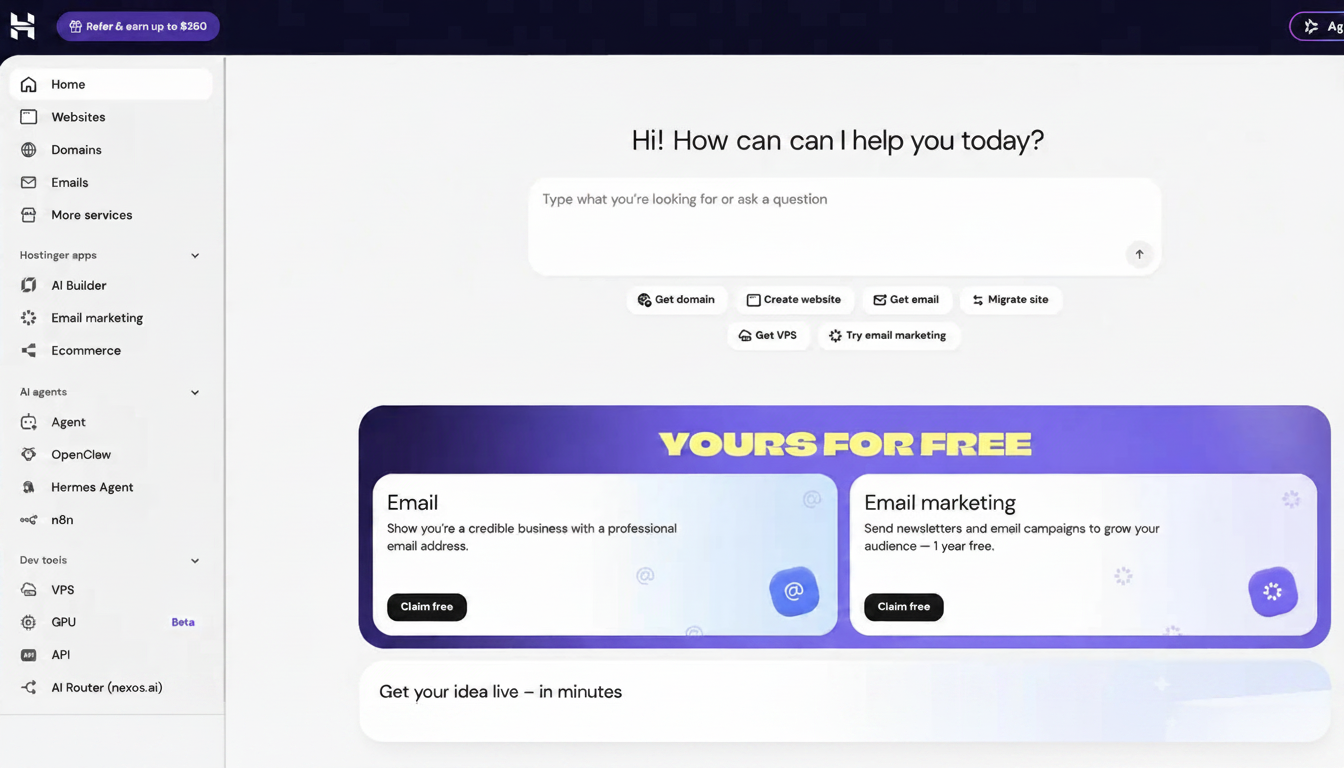
I use Hostinger to build and host all of my websites. That repeated day-to-day use is the strongest reason I am comfortable recommending it. I am not judging the service from a single setup session: I regularly return to the dashboard to manage sites, domains and the practical jobs that come with running them.
What has impressed me most is how little friction there is between logging in and finding the task I need. The interface is clean and logically organised, which mattered when I was still learning. I did not want routine actions to feel like server administration, and Hostinger has generally kept the technical side understandable.
The AI website tools have also been responsive in my use. They are useful for turning an idea into an initial structure and for making quick changes without starting every element from scratch. I still review and rewrite the output myself, but the tools shorten the distance between an idea and a workable page.
Overall, I have been genuinely impressed. For the way I work, Hostinger feels more approachable than WordPress and lets me concentrate on building the site rather than managing a larger stack of themes, plugins and settings.
My Hostinger score: 91/100
Each category is scored out of 10 and carries equal weight. The overall score is the combined total out of 100. Scores reflect my personal experience alongside the product features, limitations and value available when the page was last reviewed. See the full scoring methodology for how I assess every product.
Getting started is straightforward, with a guided setup that does not assume extensive hosting knowledge.
The hPanel interface is clear, logically organised and one of the main reasons I continue to use Hostinger.
I find Hostinger's builder easier to work with than WordPress for my current websites and level of experience.
The AI tools are responsive and useful for producing a starting point or making quick revisions, although their output still needs checking.
My websites have performed reliably in normal use, although requirements will differ for larger or more demanding projects.
Hostinger provides a strong collection of everyday hosting and website-management features, with exact inclusions depending on the plan.
Managing my websites and related services through one consistent account makes running several projects considerably easier.
Useful security and backup features are available, but their frequency and scope vary between plans and should be checked before purchasing.
Hostinger provides useful guidance and support material, although some technical issues may still require research or assistance.
The introductory pricing and 20% Hostinger discount offer strong initial value, but renewal pricing and longer commitments need to be understood.
A highly approachable hosting and website-building platform that has become my preferred option for creating and managing my sites.
What is Hostinger?
Hostinger is a web-hosting and website-building platform. Depending on the product and plan chosen, it can bring hosting, domains, email, security tools, backups and website management into one account. It also offers an AI Website Builder and supports WordPress hosting, so users can choose between a more guided hosted builder and a WordPress-based setup.
That distinction matters. Hostinger is the company providing the hosting platform and related tools; WordPress is content-management software that can run on Hostinger or another host. My preference below is specifically for Hostinger's hosted building experience in my own projects, not a claim that WordPress is universally inferior.
Why I use Hostinger for all my sites
The biggest advantage for me is having a consistent place to manage multiple projects. Once I understood the layout, adding or returning to a website felt familiar rather than like learning a new system each time.
Hostinger's hPanel presents the main website, domain, email and hosting controls in a visual interface. For a beginner, that can make routine management less intimidating than working through a traditional hosting control panel or assembling a separate set of services.
I also value the balance between guidance and control. The builder can do much of the initial heavy lifting, while I can still adjust layouts, copy, colours and individual sections. That balance is one reason Hostinger has become my default starting point for new sites.
Hostinger AI Website Builder
Hostinger's AI Website Builder is designed to generate a website starting point from a description and then let the user refine it through visual editing and AI-assisted changes. Hostinger currently describes both drag-and-drop editing and prompt-led or “vibe coding” tools; the exact tools available can depend on the product and plan.
In my experience, the AI tools respond quickly enough to keep the building process moving. I find them most useful for structure, early layouts and rapid revisions. They are an accelerator, not a replacement for judgement: I still check the copy, mobile layout, links, calls to action and factual accuracy before treating a page as finished.
Hostinger vs WordPress: my personal preference
I prefer Hostinger's website-building interface to WordPress for my current projects because it feels clearer and more self-contained. With WordPress, the flexibility is enormous, but that can also mean choosing themes and plugins, managing updates and resolving compatibility questions. Hostinger's builder gives me fewer moving parts and a faster route to a site I can edit confidently.
That does not make Hostinger's builder the better option for every website. WordPress may be more suitable where a project needs a very large plugin ecosystem, unusual functionality, extensive developer control or easier movement between hosts. My conclusion is practical: for a beginner-led site or a straightforward small-business, content or affiliate project, I have found Hostinger easier to live with.
Key Hostinger features
Features depend on the product, plan and subscription term. Check the current Hostinger plan comparison (opens in a new tab) because inclusions change by plan, term and promotion.
Website and hosting dashboard
Manage core services from hPanel.
AI Website Builder
Generate a starting point and refine it visually.
WordPress hosting
Available for users who prefer the WordPress CMS.
Domains and email
Included with some eligible plans and terms.
SSL and security tools
Plan inclusions vary.
Backups
Frequency and retention depend on the plan.
Ecommerce tools
Available for suitable builder or hosting configurations.
Support and learning material
Useful when setting up or troubleshooting.
What Hostinger does particularly well
Beginner-friendly management
The interface makes routine website administration easier to understand.
Fast route from idea to page
The builder and AI tools reduce the amount of setup required before editing begins.
Consistent multi-site workflow
Using the same dashboard across my projects saves time and reduces relearning.
Choice of building method
Users can choose a hosted builder or run WordPress, depending on their needs.
Strong initial value
Promotional pricing and the Hostinger voucher code can lower the initial cost, provided the renewal price and term are understood.
Limitations and costs to understand
The advertised introductory price is not always the price paid at renewal. Longer prepaid terms can produce a lower monthly equivalent but require more money upfront. Compare the complete initial payment, subscription length and renewal charge before buying.
Features such as domains, email, backup frequency, storage and website limits vary between plans. Do not choose solely from a headline discount. Check that the selected plan contains what the site actually needs.
A hosted website builder also involves a different type of flexibility from WordPress. If portability, specialist plugins or deep code-level control are central requirements, investigate those limits before committing.
Hostinger offers a 30-day money-back guarantee for eligible purchases, but exclusions and refund rules apply, so review the current refund policy (opens in a new tab) rather than treating it as unconditional.
Who Hostinger is best suited to
I would recommend considering Hostinger if you are a beginner building a first site, a sole trader or small business that wants a managed setup, a creator running several straightforward websites, or someone who values an integrated builder and hosting dashboard.
Consider a different route if you need highly bespoke server infrastructure, a specialist enterprise arrangement, deep developer control, or a WordPress setup built around a large and specific plugin ecosystem. The right choice depends on the site, not just the Hostinger discount.
Frequently asked questions about the Hostinger discount code
- What is the Hostinger discount code?
- The Hostinger discount code is W8XHELLOY1EH. It provides 20% off an eligible new Hostinger purchase when accepted at checkout.
- Is W8XHELLOY1EH a Hostinger referral code or promo code?
- It is a Hostinger referral code. People may also search for it as a Hostinger promo code, Hostinger voucher code or Hostinger discount code, but the offer is provided through Hostinger's referral programme.
- How do I know the Hostinger voucher code has worked?
- Check the order summary before paying. The discount and revised total should be visible. If they are not, return to the code field or referral link rather than assuming the saving will be applied later.
- Can I combine this Hostinger promo code with another offer?
- Do not assume offers will stack. Compare the final totals shown by Hostinger and use the eligible offer that produces the best checkout price.
- Does the 20% discount apply to renewals?
- The referral discount is described for eligible new purchases, not renewals. Review the renewal price shown at checkout and in the order details.
- Is Hostinger suitable for beginners?
- In my experience, yes. I find hPanel clear, the website-building interface straightforward and the AI tools responsive. A beginner should still learn the basics of domains, backups, security and renewals.
- Is Hostinger better than WordPress?
- They are not direct equivalents: Hostinger provides hosting and a hosted builder, while WordPress is a CMS that can run on Hostinger. I personally prefer Hostinger's builder for my current projects because it is simpler for my workflow.
- Can I build a WordPress website with Hostinger?
- Yes. Hostinger offers WordPress hosting as well as its own website builder. Check the current plan details before choosing.
- Does Hostinger include a free domain and email?
- Some eligible plans and subscription lengths include a domain or email for a stated period. The inclusions vary, so confirm them on the selected plan rather than treating them as universal.
- Is there a money-back guarantee?
- Hostinger advertises a 30-day money-back guarantee for eligible purchases, subject to exclusions and its current refund policy.